Why Everyone is Buying the Czur Et24 Pro Book Scanner (Full Review)
Introduction
I've been using the Czur Et24 Pro book scanner for several months now, and I can honestly say it's changed how I handle paper in my home office. I bought it to digitize a mix of academic books, personal notebooks, and a growing pile of paper documents, and after a few hundred pages scanned I feel qualified to describe what it does well — and where it still falls short. In this review I'll walk you through my hands-on experience, the things I liked, the annoyances that stuck with me, and who I think should consider buying one.
Why I Bought the ET24 Pro
I was tired of wrestling with a flatbed scanner (slow, awkward for thick books) and frustrated by the limitations of a sheet-fed scanner (destructive, bad for fragile pages). I wanted something that could quickly scan bound books without damaging spines and that would produce searchable PDFs with decent OCR. The ET24 Pro's overhead design, automatic page flattening, and promise of fast, one-button capture fit the bill on paper — so I decided to test it long-term in my own workflow.
What I Tested and How
Over the last few months I scanned a variety of material: paperback novels with tight spines, older hardcover textbooks with glossy pages, thin magazines, handwritten notebooks, and a stack of loose documents that I used to compare speed against a sheet-fed scanner. I used both the bundled software on Windows and macOS (where supported), tried different resolution settings, experimented with built-in lighting and exposure, and ran OCR on batches to see how searchable the output became.
Design and Build Quality
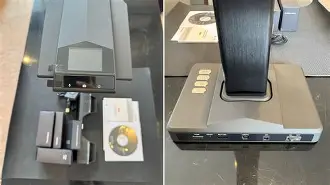
Out of the box, the ET24 Pro looks and feels like a serious desktop device. The unit is heavier and more rigid than the compact overhead scanners I've tried before, which helps with stability during capture. The arm adjusts smoothly and locks into place without wobble — I appreciated that when scanning single pages quickly. The base is wide enough to keep everything steady on a crowded desk, though it does take up more horizontal space than I initially expected.
One small gripe: cable routing could be tidier. The power adapter and USB cable are standard, but I found myself adding a cable clip to keep things tidy because the cables stick out at a slightly awkward angle for my setup.
Scanning Performance: Speed and Handling
What I liked most was how fast I could go from one page to the next. After getting used to the device's capture rhythm, I could scan a page in a couple of seconds: place, press the capture button (or use the foot pedal I added), flip, repeat. The ET24 Pro's auto-cropping and rotation work reliably, so most of my scans required minimal manual trimming.
The page flattening algorithm deserves special mention. I was skeptical at first — my copy of a thick textbook with a curved spine seemed doomed — but the software flattened the curvature remarkably well in most cases. That saved me the lengthy manual corrections I used to do with a flatbed scanner.
Find top-rated Laptops & Computers products at great prices.
Browse Now →That said, it isn't magic. Very glossy pages produced more glare than I expected, especially under the built-in lights. When scanning photography-heavy magazines or glossy dust jackets, I had to angle the page slightly or adjust the exposure to reduce hotspots. Also, very delicate, brittle pages still made me nervous; I avoided forcing those into a completely flat position and used a protective sheet instead.
Software and OCR
The bundled software is where the ET24 Pro both shines and shows its limits. On the positive side, automatic batch scanning, one-click PDF export, and built-in OCR made my workflow much faster. I could scan a stack of loose pages and have a single searchable PDF in minutes. The OCR accuracy was generally good for typed text — clear fonts, standard sizes, and clean paper converted into searchable text with high accuracy.
However, my experience with handwriting and unusual fonts was mixed. Handwritten notes, especially cursive or light-pencil sketches, did not OCR well; the software either ignored those lines or mistranslated them into gibberish. For older books with decorative fonts or columns, I needed to correct the OCR manually. Another annoyance: the software occasionally crashed when I tried to process very large batches on an older laptop, so I started breaking batches into smaller chunks to avoid that.
Image Quality and File Output
Image quality exceeded my expectations for most document types. Text was crisp and legible at moderate resolutions, and I liked having the option to produce both high-resolution TIFFs (for archival) and compressed PDFs (for sharing). Color fidelity was generally good for books and documents, though as I mentioned, glossy pages sometimes showed glare and reflections that required retakes.
I appreciated the flexible output options: single- and multi-page PDFs, searchable PDFs, JPEG/TIFF exports, and export destinations to cloud folders. The compression settings allowed me to balance file size and readability for archiving. For long-term archival of rare pages, I scanned at a higher resolution and kept an uncompressed copy.
Daily Use: Ergonomics and Workflow
In daily use, the ET24 Pro became noticeably faster than my old flatbed workflow. I liked the tactile capture button and eventually invested in a foot pedal so I could flip pages with both hands free — that improved speed and comfort a lot. The device's footprint is larger than a portable scanner, so it's best reserved for a dedicated desk or workspace rather than being carried around frequently.
One workflow irritation: the software prompts for naming conventions and output paths sometimes interrupt a long batch scan if you're not careful with settings. Once I configured a default folder and naming pattern, the interruptions mostly disappeared. Another ongoing annoyance was software compatibility: occasional updates changed behaviors, and I had to re-learn a couple of menu locations after updates.
Find top-rated Laptops & Computers products at great prices.
Shop Amazon →Pros & Cons
- Pros
- Excellent page flattening for bound books — saved me time on post-processing
- Fast capture rhythm once you're practiced — efficient for large projects
- Solid build and stable arm — no wobble during capture
- Flexible output options (searchable PDFs, TIFF/JPEG, cloud exports)
- Good OCR results for standard printed text
- Cons
- Glare on very glossy pages; sometimes requires retakes or exposure adjustments
- Handwritten content OCR is poor — expect manual correction for notes
- Bundled software can be finicky on older hardware and may crash with very large batches
- Footprint and cables take up desk space — not the most portable solution
- Occasional software UI changes after updates that disrupt established workflows
Comparison: How the ET24 Pro Stacks Up
To help you decide whether the ET24 Pro is the right tool for you, I compared it to two other common scanning approaches: a dedicated sheet-fed scanner (fast for loose pages) and a traditional flatbed scanner (great for single spreads and fragile items). This is a qualitative comparison based on my experience and testing.
| Feature | Czur Et24 Pro (Overhead) | Sheet-fed Scanner | Flatbed Scanner |
|---|---|---|---|
| Speed | Fast for books and single pages (1–3s per page with practice) | Fastest for loose pages and high-volume jobs | Slow; each page requires placement and lid handling |
| Book Handling | Excellent — designed for bound materials | Poor — typically requires disbinding | Good for single spreads, but awkward for thick books |
| Image Quality | Very good; great for text and most images | Excellent for loose clean paper | High-quality scans with consistent color and resolution |
| OCR | Good for printed text; weak on handwriting | Good with well-aligned text | Good, but manual cropping sometimes needed |
| Portability | Moderate — desk device but can be moved | High — small, often compact | Low — bulky and heavy |
| Best For | Digitizing books, magazines, mixed media | Bulk loose document scanning | High-quality single flat objects and photos |
Buying Guide: Is the ET24 Pro Right for You?
I've summarized what I learned into a short buying guide so you can decide whether this scanner suits your needs.
Who should buy the ET24 Pro?
- People who scan lots of bound books and want to preserve spines without disbinding
- Archivists and students digitizing textbooks, manuals, and reference books
- Home-office users who want searchable PDFs from printed reports and notes
- Anyone who values speed and workflow efficiency over ultimate portability
Who should consider something else?
- If you mostly scan single loose pages in very large volumes, a sheet-fed scanner may be faster and cheaper per page.
- If you need perfect color fidelity for high-end photo archiving, a high-quality flatbed might be better.
- If you predominantly have handwritten notes you need accurately transcribed by OCR, be prepared to do manual corrections or explore specialized handwriting OCR tools.
Key questions to ask before buying
- How many pages do you expect to scan per week/month?
- Are most of your materials bound books or loose pages?
- Do you need high-resolution archival files, or is a compressed searchable PDF sufficient?
- Do you have a machine capable of running the scanning/OCR software smoothly for large batches?
Tips from my experience
- Use a foot pedal if you plan to scan long runs — it saved my hands and doubled my speed.
- Scan glossy pages with the lights dimmed or at a slight angle to reduce glare.
- Break very large batches into smaller groups if you're on an older laptop to avoid software instability.
- Keep a small soft brush or lint-free cloth handy to remove dust from pages before capture — it cuts down on OCR errors.
Final Thoughts and Conclusion
After several months with the Czur Et24 Pro, I can say it's become a central tool in my digitizing workflow. In my experience, its biggest strengths are the convenience of non-destructive book scanning, effective page-flattening, and the speed that comes from an overhead capture rhythm. What I found was that it significantly reduced the time and frustration I previously spent fighting with a flatbed scanner.
That said, it's not without flaws. I noticed that glossy pages and handwritten material are weaker points, and the bundled software can be temperamental on older machines. If you need a perfect, out-of-the-box solution for every conceivable document type, there will be trade-offs. For most home users, researchers, and small-archive projects, though, the ET24 Pro hits a very compelling balance between usability, quality, and efficiency.
If you value fast, nondestructive book scanning and are prepared to accept a few software quirks and occasional retakes for glossy pages, I found the ET24 Pro to be a practical, time-saving purchase. I've been happy with the results and continue to rely on it every week — it turned a tedious task into something almost enjoyable.